Showing posts with label Task Management. Show all posts

Monday, February 2, 2015

Look for the Positives

Whew! This past week has been crazy, and I have had some computer trouble that has put me behind in a lot of things. I'm still going to do all the posts from this past week, however. I'll combine the Mid-Week Motivation with Flexible Friday, here. 

Like I said, I've had some computer problems that have caused tasks like homework and email to take longer than usual. For someone like me who loves efficiency and hates to be late or slowed down, this was really annoying and stressful. However, while searching for solutions to my issues, I stumbled upon a little treasure. 

This little treasure breathes efficiency and made plowing through some of my work seem like a walk in the park. It makes a drudging task super easy and quick! And, it's FREE! Ever better. :)

So what is this gem, you ask? 


Spreeder is a free, online, speed reading software! You simply copy and paste the passage you want to read into its dialogue box, and it does the rest! You can also install the Spreeder toolbar button (I like it). With the button, you don't have to copy and paste if you're reading in your web-browser. Just click on the button when you're wanting to speed read something. 

Now, I was skeptical at first. I was afraid I wouldn't be able to comprehend what I read. But, I read about the Spreeder method a little and how your inner voice slows your reading and tried it out with a module that has a quiz at the end. I passed the module quiz with 100%, and read the corresponding passage in half the time it would normally take me to skim it!

Ok, so let's tie this back into our Mid-Week Motivation. I'll be honest; I got really frustrated and irritated with my computer issues this week, and it was difficult to stay on task. But, without these issues, I might not have found Spreeder, and I would still be drudging through long, boring paragraphs. So, maybe things aren't going super smoothly right now, but there could be a valuable gain from your struggle. You could learn a new skill, meet someone new, be forced to try something you wouldn't ordinarily (you might even like it), or you may find a much better way to do things. No matter the case, KEEP GOING! Meanwhile, stay focused, but be sure to take the blinders off and look around you for those little gems floating on the roadside; you never know how helpful they might be!

Have you had a diamond in the rough experience? Big or small, I'd love to hear about it! 


Sunday, December 28, 2014

How to Stay on top of Your Schoolwork


Okay, I know this sounds crazy because life happens, you get sick, new projects arise, work schedules change, etc. I know, I know, but trust me, there IS a way to stay on top of all your school assignments and avoid that drowning feeling mid-way through the semester. 

My secret weapon? Google Calendar! Now, you need a Google account, but once that is set up, you're ready to go! So, how do I use this tool to stay on top of things? It's easy with these 6 simple steps! 


  1. Create a calendar based on various aspects of your life and choose a color for each one. For instance, I have a calendar for my classes, due dates and exam dates, my work schedule, and extra-curricular activities. You can have more or fewer, figure out what works for you. But, once you've created your calendars, you can adjust how many your view at one time. 
  2. Collect all your syllabuses from your classes. Enter all your assignment due dates and exam dates for the whole semester. Yes, I know this takes a little time, but trust me, it's totally worth it. 
  3. Next, if you have regular meetings or you work, enter that in too. I prefer to make separate calendars for these things so that I can make my work schedule a separate color from other parts of my day. When you create an event, you can click "Edit Event" to set your event to repeat and set specific times!
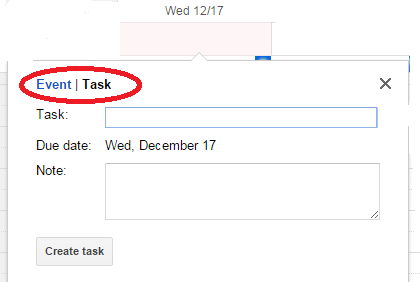
  4. Now, you have a basic framework of your day, week, and month. Here comes the real task management, drowning prevention awesomeness. Now that you know when things are due, and about how much time you will have each day to do schoolwork, you can go ahead and plan your work! When you click on a date, the default is to create an event, but you can also create a task for that day. Just switch from Event to Task! I use this to make a tentative schedule of when I am going to work on assignments. 
  5. Next, get the most out of this calendar! If you have an android phone, you can download the google calendar app to have your calendar on the go. If you have an iPhone, you can sync this calendar with your phone calendar by going into your phone settings and choosing "Mail, Contacts, and Calendars", signing into your Google account, and turning on your calendar syncing. 
  6. Finally, use this tool and adapt it to fit your lifestyle. Lay things out early so that when your friend says, "Hey, let's go to the beach for a couple days!" you can know immediately if you're able to go without dismissing your commitments or what assignments you need to do on the way! And, if life happens, remember this is a framework. It is a way of managing what must be done so that you are less likely to forget things and can better adapt to the curve balls that life throws at you. If you don't do a task on the day you originally set, don't be discouraged. Just add it to your list for the next day, and keep going!